7 SEO Monitoring Tools to Track Rankings, Site Health & AI Answers
Topic: SEO
Published:
Written by: Bernard Huang
Marketers need a handful of SEO tools to monitor website health and content performance so they can not only maintain but improve organic search rankings, site traffic, and ROI from digital strategies. These include:
Content monitoring tools (what we offer!) to track the clicks and content grade of your live pages and flag content decay.
Technical SEO tools to audit your site for back-end or content-based issues.
Google Search Console to monitor technical SEO, improve desktop and mobile usability, and stay ahead of potential problems.
Rank trackers to see where your site appears for target keywords and watch rank changes.
Backlink management tools to see which websites link to you and how backlinks impact rankings and SEO.
Local SEO solutions to track local rankings and optimize your Google Business profile.
Prompt tracking tools to see whether AI answers in ChatGPT, Claude, Gemini and Google mention your brand.
So we put together this guide with recommended tools for each category: Clearscope, Screaming Frog, Google Search Console (plus Google Analytics and Bing Webmaster Tools), Ahrefs and Semrush. By the end, you’ll know what each one monitors, what it costs to start (as of November 2026) and how to take the next step.
Note: Clearscope is our product, so we cover it first. Facts about the other tools come from each vendor’s own site, checked in November 2026.
SEO Monitoring Tools at a Glance
Clearscope: page clicks and content grade, content decay, and AI mentions with Query Tracking. Free to start.
Screaming Frog SEO Spider: technical crawls and audits. Free up to 500 URLs; paid licence £199 a year.
Google Search Console: indexing, Core Web Vitals, and your performance in Google Search, AI Overviews and AI Mode. Free.
Google Analytics: traffic, engagement and conversions. Free; Analytics 360 is the paid tier.
Bing Webmaster Tools: Bing search data and how often Microsoft Copilot and Bing’s AI summaries cite your pages. Free.
Ahrefs: weekly rank tracking, backlinks, and AI mentions with Brand Radar. From $129 a month; no free trial, but a limited free account for site owners.
Semrush: daily rank tracking, site audits, local SEO and AI visibility. From $139 a month; 7-day free trial.
Prices are entry prices on monthly billing unless noted, from each vendor’s own pricing page as of November 2026.
Clearscope: Monitor Content Performance, Content Decay and AI Answers
Track clicks, content grade and AI mentions for the pages you’ve already published.
Clearscope’s Pages tab (the product page calls it Monitor; older posts call it Content Inventory) gives you one list of the pages you want to watch: blog posts, landing pages, product pages. Connect Google Search Console and every page shows its clicks, SEO value and current content grade.
Each page has a target query, and Clearscope grades the live page against it. Pages tracks clicks and grade once a page is live and flags it when either one slips, so a page that used to earn an A doesn’t quietly fall behind what now ranks.
Saved views sort your pages into lists worth acting on, including:
Content Decay: pages losing clicks from their peak.
Striking Distance Queries: pages ranking just outside page one.
Internal Linking: related pages with suggested links and anchor text.
Technical Issues: pages with indexing problems to troubleshoot.
You can also build custom views (a topic cluster, a campaign, one author’s pages) and subscribe to any view: every Monday you get an email listing the pages that entered or left it.
Read more: How to Create a Content Inventory & Perform a Content Audit
Pages makes it easy to monitor and manage all of the content that lives on your site:
You can see what already exists on your site to avoid keyword cannibalization.
Since you know what content lives on your site, you can also find opportunities to re-optimize existing web pages for (related) secondary keywords.
You know when content starts to become outdated (when clicks or grades slip) so you can schedule updates strategically, instead of slotting posts in at random or waiting for performance to take a hit.
You can audit and troubleshoot website content to ensure all web pages are optimized for target keywords.
By staying on top of Pages, you can keep your site optimized, at least from a content perspective (we’ll talk about technical and off-page SEO later), and put each page in the best position to reach and engage the people searching.
Monitor AI Answers With Query Tracking
Rankings are only part of the picture now. People also ask ChatGPT, Claude and Gemini, and those answers mention some brands and not others. Prompt tracking tools record those answers over time so you can see whether you’re mentioned, and who’s named instead.
Clearscope’s version is Query Tracking. Add the queries you care about and it checks Google search (the traditional results), ChatGPT, Claude and Gemini every day. You can read the answers themselves and see exactly which brands get named, then use Drafts to improve the pages that should be part of the answer.
When a page needs a refresh, you can open it in Drafts with one click. Drafts builds on the query’s intent and the pages that rank for it, shows the headings and terms to cover, and grades your edit before it ships, so you can update information, add links or images and know the page is optimized when you’re done.
And Discoveries finds the questions buyers ask, with search volume and intent, so you can plan what to write next.
To see Pages, Query Tracking and Drafts on your own site, start for free.
Screaming Frog: Website Crawler and Technical SEO Audits

Screaming Frog free SEO tool to perform site audits
Screaming Frog’s technical SEO tool is handy for assessing current website health and determining where to improve performance. This tool discovers SEO issues that hurt search rankings so you can make the right updates. It can:
Create XML sitemaps and find pages with crawlability or indexing issues.
View URLs blocked by robots.txt, meta robots or X-Robots-Tag directives.
Evaluate internal links and provide recommendations to improve URL structure.
Review page titles and meta descriptions.
Find exact duplicate pages across your site.
Audit redirects, including redirect chains and loops.
Detect broken links (404s) and server errors.
Extract information from individual site pages — you can configure the crawler to grab a variety of data (and you can get super in-depth here).
Pull Google Analytics and Search Console data into a crawl, or connect AI providers (OpenAI, Gemini, Anthropic and Ollama) to analyze pages as they’re crawled.
You can use Screaming Frog for a one-time clean-up and then monitor site health in Google Search Console. For ongoing monitoring, schedule crawls and use crawl comparison to see what changed since the last one.
The free version crawls up to 500 URLs, which suits small sites. Screaming Frog notes that some advanced features are restricted in the free version.
The paid licence removes the URL limit and costs £199 per user per year (as of November 2026; the pricing page lists GBP), with lower per-licence prices from five licences.
The SEO Spider can be a little complex if you don’t have a background in technical SEO; you may need help from an expert to read the reports and decide what to fix.
Google Search Console: Monitor Indexing and Google Search Performance

Google’s free digital marketing & SEO analysis tool
We recommend Google Search Console (GSC) for ongoing site and SEO monitoring. It’s free for anyone who verifies they own a site, and it shows how Google crawls, indexes and ranks your pages, with the reasons when something goes wrong.
In other words, it’s Google’s own view of your site: what it has indexed, what it couldn’t, and which queries bring people to you.
With Google Search Console, you can:
Dig into page and video indexing — see which pages/videos are indexed and troubleshoot non-indexed pages (again, Google will tell you why items aren’t indexed so you can make changes).
Submit sitemaps and check them for processing errors.
Temporarily hide URLs from Google search with the Removals tool.
See which sites link to yours, and your most-linked internal pages, in the Links report.
Check Core Web Vitals, based on how your pages perform for real visitors.
Check for manual actions and security issues Google has found on your site.
Inspect any URL to see what Google has indexed and test the live page.
View performance: the queries your site appears for, with clicks, impressions, click-through rate and average position, filtered by page, country or device. The Insights report gives a simpler summary of the same data.
See how often links to your pages appear in AI Overviews and AI Mode in the Generative AI performance report (available for all sites since August 31, 2026).

Google Search Console dashboard (Source: Google)
The tools provided by Google Search Console let you address back-end issues so you can maintain a “healthy” (SEO-friendly) site — which is the foundation for all page rankings.
If your site isn’t set up to perform well in search engines, you can’t expect to see your content in the top rank positions.
As mentioned, GSC is completely free, so you can check your data any time. It only covers Google, though: it won’t tell you whether ChatGPT, Claude or Gemini mention you.
Bonus: Google Analytics

Google Analytics to measure page performance & SEO metrics
Google Analytics (GA) complements GSC and allows you to monitor content performance: you can use GSC to address back-end issues, see how you perform in search engines, and see (high-level) site traffic — then you use GA to dig into site traffic, user activity, and individual page metrics.
Google Analytics is free. Google also sells Analytics 360 for organizations that need more advanced tools, but many small and growing teams use the free version without issue. You can link it to Search Console so search and on-site data sit side by side.
In Google Analytics, you can:
View real-time site activity — see who’s active on your site and on what pages.
Check traffic sources and see where users are coming from — paid ads, organic traffic, and referral sites.
Learn about your website visitors (where audiences are located, how they find you, how they access and engage with your site).
Create and track conversions so you can measure specific goals (like trial or newsletter sign-ups, demo requests, sales, etc.) from content.
Determine which web pages are “most successful” — draw in the most content and have high conversion rates — and which pages need attention.
Reporting on traffic and conversions lets you measure ROI from content and understand which content pieces and SEO strategies are effective; then, you can adjust strategies as you learn and better prepare for the future.
Staying on top of content also prevents issues from falling to the wayside — you can see which pages aren’t drawing in traffic or conversions and determine how to address low performers.
Note: Google also offers other SEO and marketing software like Keyword Planner and Google Trends to explore keyword ideas and build content plans; Looker Studio to graph out website traffic; Google Ads to manage PPC campaigns, and more.
Bonus: Bing Webmaster Tools
Bing Webmaster Tools is Microsoft’s free counterpart to Search Console. Its AI Performance report (in public preview since February 2026) shows how often your content appears as a source in Microsoft Copilot, AI-generated summaries in Bing and some partner integrations, which pages appear, and a sample of the queries the AI used to find them.
Search Console only covers Google, so it’s worth verifying your site in both.
Ahrefs: Monitor Keyword Rankings, Backlinks and AI Mentions

Ahrefs SEO platform to manage rank tracking and link building
Ahrefs is our recommended solution to monitor website rankings and backlinks. It’s popular for its Rank Tracker tool that lets you see rank positions for specific keywords, but we also use Ahrefs to manage backlinks and referring domains.
In addition, Ahrefs has strong competitor analysis and keyword research tools — you can explore keyword ideas (check search volumes, difficulty scores, and CPCs), see which keywords competitors rank for, and identify content gaps.
Here’s how monitoring works in Ahrefs.
First, in Rank Tracker:
Add the site you want to monitor; you can create separate projects to track rankings for multiple sites.
Add your target keywords and the locations you care about, from country down to ZIP code, on desktop and mobile.
Add up to 10 competitors to compare rankings, traffic and SERPs.
Ahrefs then reports each tracked keyword, the page that ranks for it and its position, updated weekly. Rank Tracker also tracks 19 SERP features, including AI Overviews, featured snippets and People Also Ask, and can warn you when the page you want to rank for a keyword is outranked.
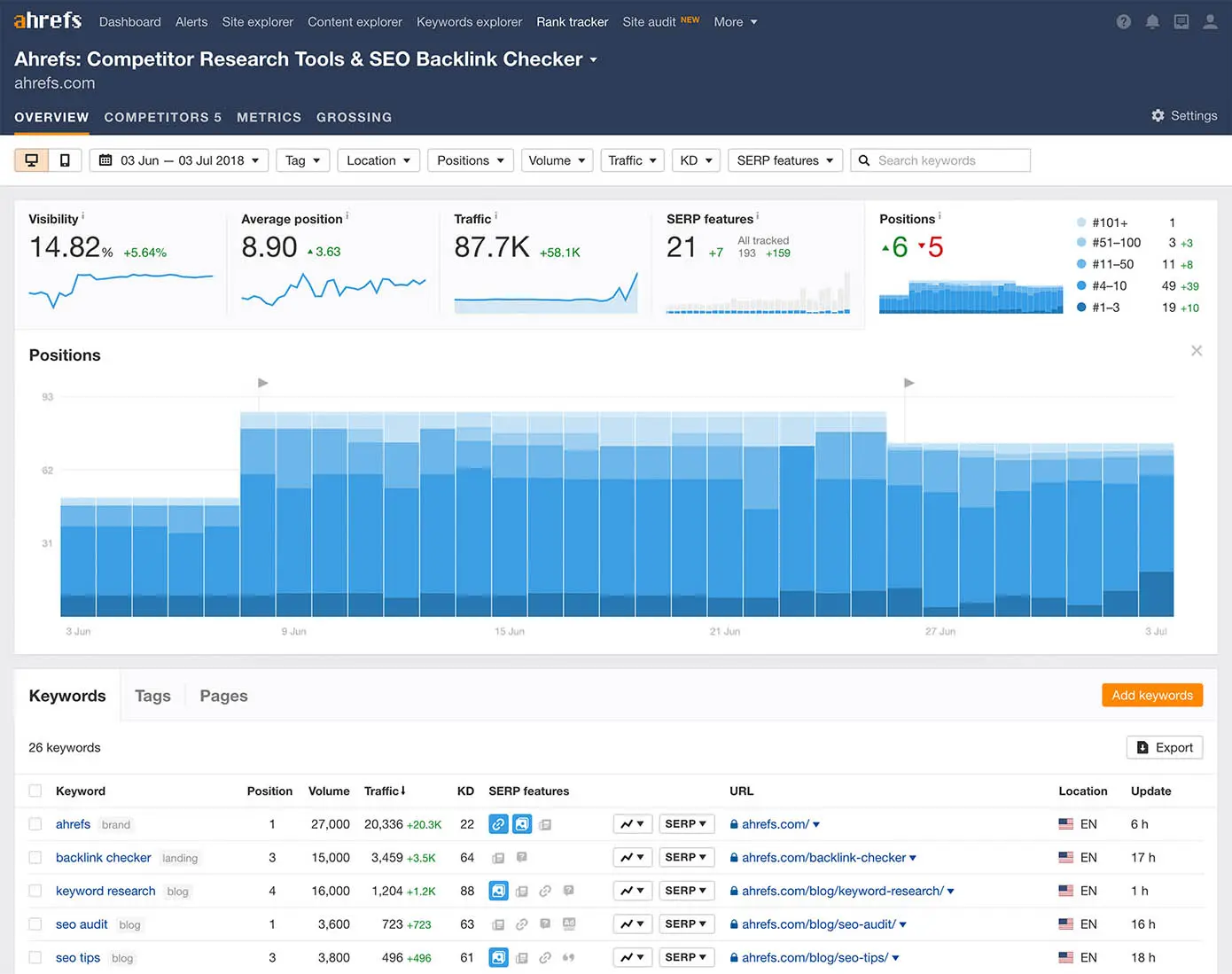
Ahrefs Rank Tracker (Source: Ahrefs)
You can check the report at any time to see the most current rank position, and Ahrefs keeps a history of rank changes so you can track movement and address pages that show declines.
Read more: How Long Does It Take to Rank in Google with SEO Techniques?
After that, you can use Site Explorer to perform backlink analysis: just paste your site URL to review the report and check your backlink profile. Reports also show traffic sources and organic keywords.

Ahrefs backlink tracking tool (Source: Ahrefs)
The backlink checker shows you a list of websites and web pages that link to your site (even the anchor text that’s used to link to content).

Ahrefs backlink results page
You can use this data to audit backlinks, see which referring sites matter most, and adjust your link building to improve authority and rankings.
Pro Tip: You can also plug competitors’ sites in the Site Explorer to review their backlinking strategies, see keywords they rank for, and check additional SEO data.
For AI answers, Ahrefs has Brand Radar. It measures how often your brand is mentioned and your pages linked as sources across AI Overviews, AI Mode, ChatGPT, Perplexity, Gemini and Copilot, plus your AI share of voice against competitors. Brand Radar is included in every plan; tracking your own custom prompts (which also covers Claude) is a paid add-on, from $50 a month.
Ahrefs plans start at $129 a month (Lite, billed monthly, as of November 2026). There’s no free trial, but Ahrefs Free gives website owners limited access to Site Explorer and Site Audit.
Read more: How to Get Good Backlinks: A Step-by-Step Guide
Semrush: Daily Rank Tracking, Local SEO and AI Visibility

Semrush online marketing tools to monitor SEO performance
Finally, Semrush is an online marketing and SEO platform sold as toolkits, so you can pay for the parts you need.
Semrush offers:
SEO Toolkit: technical site audits, daily Position Tracking, the organic keywords your site (and competitors’ sites) rank for, and backlink profiles.
AI Visibility Toolkit: tracks prompts in Google Search, ChatGPT, Perplexity, Gemini and more, so you can see whether AI answers mention your brand.
Content Toolkit and Traffic & Market Toolkit: for content planning and for researching competitors and markets.
Advertising Toolkit: for PPC research and campaigns.
Local Toolkit and Social Toolkit: for local search and social media.
We recommend Semrush for local SEO. The Local Toolkit includes Google Business Profile management and a Map Rank Tracker for local rankings; the Pro plan adds listing management and review management.
Local Toolkit plans are priced per location: Base is $30 a month and Pro is $60 a month, both billed annually (as of November 2026).
Semrush updates tracked keywords daily on every SEO plan, so it’s the faster option here if you watch rankings closely. Toolkits can be combined, which makes it a common pick for agencies and marketing teams that cover more than SEO.
Semrush’s SEO plan starts at $139 a month billed monthly, and the SEO + AI Search plans, which add prompt tracking, start at $199 a month (as of November 2026). Paid plans come with a 7-day free trial, and a free plan allows 10 reports a day.
Final Notes
With these tools you can monitor on-page, off-page and technical SEO, and now AI answers too. Most teams don’t need all of them: Search Console and Bing Webmaster Tools are free, a crawler covers technical health, Ahrefs or Semrush covers rankings and backlinks, and Clearscope shows which pages are slipping and whether AI answers mention you.
New to the topic? Start with what SEO monitoring is and why it matters, then come back to pick your tools.

SEO Content Development: Our Guide to SEO Content Creation
Our guide covers everything you need to know about SEO content development — how to build a content plan, write SEO content & see results from content.
5 Enterprise SEO Tools and What Each One Is Best For
Five enterprise SEO tools compared: seoClarity, Clearscope, Semrush, Google's reporting tools and Ahrefs. What each is best for, and how each handles AI search.
What is SEO value and why it matters
Understand what SEO value is, how it’s calculated, its key metrics, and how it can demonstrate the ROI of SEO in your digital marketing efforts.