Internal Linking: What It Is and Why It Matters for SEO
Topic: Link Building
Published:
Written by: Bernard Huang
TL;DR: What Is Internal Linking?
Internal linking refers to the practice of linking one page on a website to another page within the same site. This technique is a fundamental part of site structure and Search Engine Optimization (SEO).
Unlike external links, which point to pages on different websites, internal links keep users within the same domain.
For instance, if you're reading a blog post and click a link that directs you to another article on the same site, that's an internal link.
This practice helps search engine crawlers understand the site structure and discover new content efficiently.
Quick Overview of Internal Linking
The key distinction between internal and external links lies in their target locations.
Internal links connect pages within your website, while external links lead the user or bots to different domains.
Both types play vital roles in SEO, but internal links are crucial for optimizing website navigation and user experience.
Internal links also assist in link building by distributing link value across the site, enhancing the overall authority.
Key Terms Explained
Anchor Text: This is the clickable text in a hyperlink, which should describe the linked page's content. For example, "SEO tips" might be anchor text linking to a page about SEO strategies.
Link Juice: This is a colloquial term referring to the value or authority passed from one page to another via links, closely related to link value.
Link Equity: This is the SEO value passed from one webpage to another, influencing search engine rankings.
Crawlability: This term refers to how easily a search engine can crawl or access the pages of a website, enhanced by a well-organized internal linking structure. Bots from search engines follow these internal links to index content.

Why Internal Linking Matters for SEO
Understanding internal linking is crucial for SEO beginners.
It's one of the simplest yet most impactful ways to improve a website's SEO performance.
Proper internal linking helps search engines understand the relationship between different pages and their relative importance, which can directly affect search rankings.
Additionally, internal linking best practices help direct users to relevant content, enhancing their overall experience.
The benefits include:
Enhancing your SEO
Improving UX and site navigation
Boosting page authority
1. It Enhances Search Engine Optimization
Internal linking is essential for SEO because it helps distribute link value across a website, enhancing the SEO of important pages—and not just your homepage. It’s a smart way to boost important pieces of content across your site, too.
Search engines like Google use internal links to discover new pages, determine the hierarchy of website pages, and distribute authority.
The number of internal links pointing to a page can signal its importance within the site structure.
2. It Improves User Experience and Navigation
Internal links significantly enhance user experience by simplifying website navigation.
Effective internal linking helps users find relevant content, keeping them engaged and reducing bounce rates.
For example, the main navigation menu, footer links, and category pages guide users to the most important pages or essential areas of your site.
3. It Boosts Page Authority and Ranking Factors
Internal linking helps establish a page's authority within a website.
Pages with more internal links are often considered more important, which can boost their authority and influence PageRank—a Google algorithm component that assesses the importance of web pages.
High-authority pages can pass this value to other pages, supporting the site's overall SEO strategy.
Internal links also spread the value of external backlinks. When another site links to one of your pages, the internal links on that page pass some of that authority on to the rest of your site.
How Do Internal Links Work?
Internal Linking Structure and Site Architecture
A well-planned internal linking structure is fundamental to a robust website structure.
Most sites follow a simple site hierarchy: the homepage at the top, then category or pillar pages, then individual articles. An XML sitemap gives search engines a list of your URLs, but it does not show how those pages relate to each other. Internal links do that.
There are four main types of internal links:
Contextual Links: Links within the body content that guide users to related pages or internal pages. For instance, a piece of content about SEO might link to another article on keyword research. Contextual links are part of on-page SEO, because you choose them as you write each page.
Navigational Links: Links that are part of the site's navigation, such as menus, subcategories, and breadcrumbs. They appear on every page and show which pages sit at the top of your site hierarchy.
Footer Links: Links at the bottom of every page. They usually point to pages people look for that do not fit in the main menu, such as contact, pricing, and policy pages.
Sidebar Links: Links beside the main content, such as related posts or popular articles. They help readers find the next page to read.
Navigational, footer, and sidebar links are set once in your site template. Contextual links are added page by page, so that is where most internal linking work happens.
All four types help search engines move through your site. Google's link best practices say Google uses links to find new pages to crawl and to judge how relevant a page is. They also say every page you care about should be linked from at least one other page on your site.

Topic Clusters and Pillar Pages
Internal links also show search engines which pages belong together. The most common way to organize them is with topic clusters.
A topic cluster has one pillar page that covers a broad subject. Some people call this cornerstone content. Around it sit cluster pages that each answer one narrower question.
The pillar page links to every cluster page, and every cluster page links back to the pillar page. Cluster pages on closely related questions can link to each other, too.
This interlinking gives readers a clear path through the subject. It also shows topical relevance, which is one way to build topical authority over time.
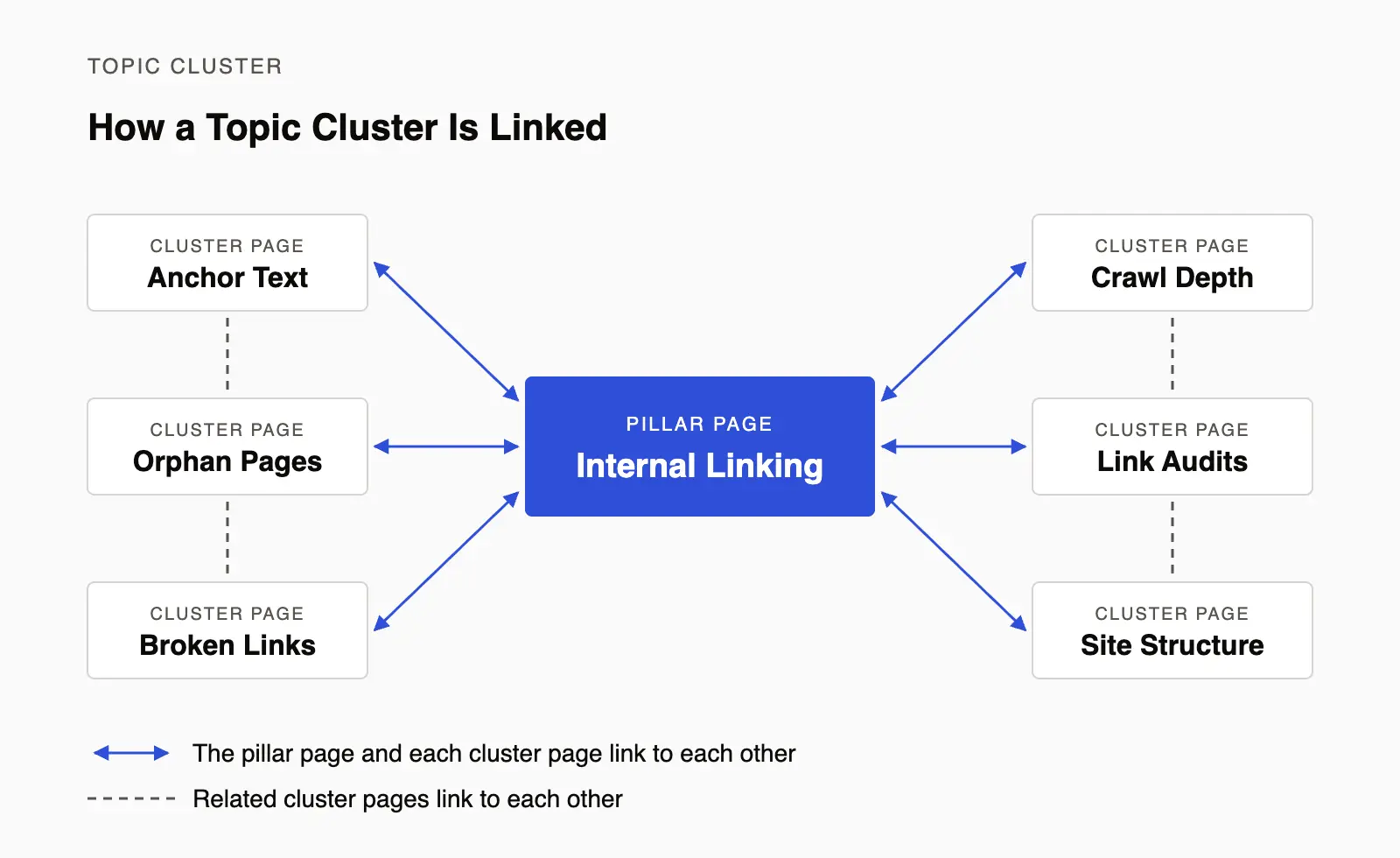
In a topic cluster, the pillar page and its cluster pages link to each other.
Implementing Internal Links
Internal links can be placed in various locations, such as headers, footers, or sidebars.
Tools like Clearscope’s Content Inventory, Ahrefs, SEMrush, or the Yoast SEO plugin for WordPress can help identify internal linking opportunities and optimize for them.
These tools often provide suggestions for internal links based on the content and SEO goals, such as linking landing pages and target pages.
Internal Linking Strategy
Building a strategic internal linking approach involves identifying key pages that need more visibility throughout your site or in the search engine results pages (SERPs) and ensuring they are linked appropriately.
It's essential to use descriptive anchor text and avoid over-optimization, like keyword stuffing.
Pro-tip: Overusing internal links or using irrelevant anchor text can lead to penalties from search engines.
Here’s an example of paying attention to the importance of internal linking in your content strategy:
Suppose you have Pages A, B, C, and D, all covering related topics about your business’s services. However, Page D isn’t linked internally from the content on Pages A, B, or C.
Page D would be considered an orphan, and it would be a piece of content that will take more effort for both interested readers and search bots to find.
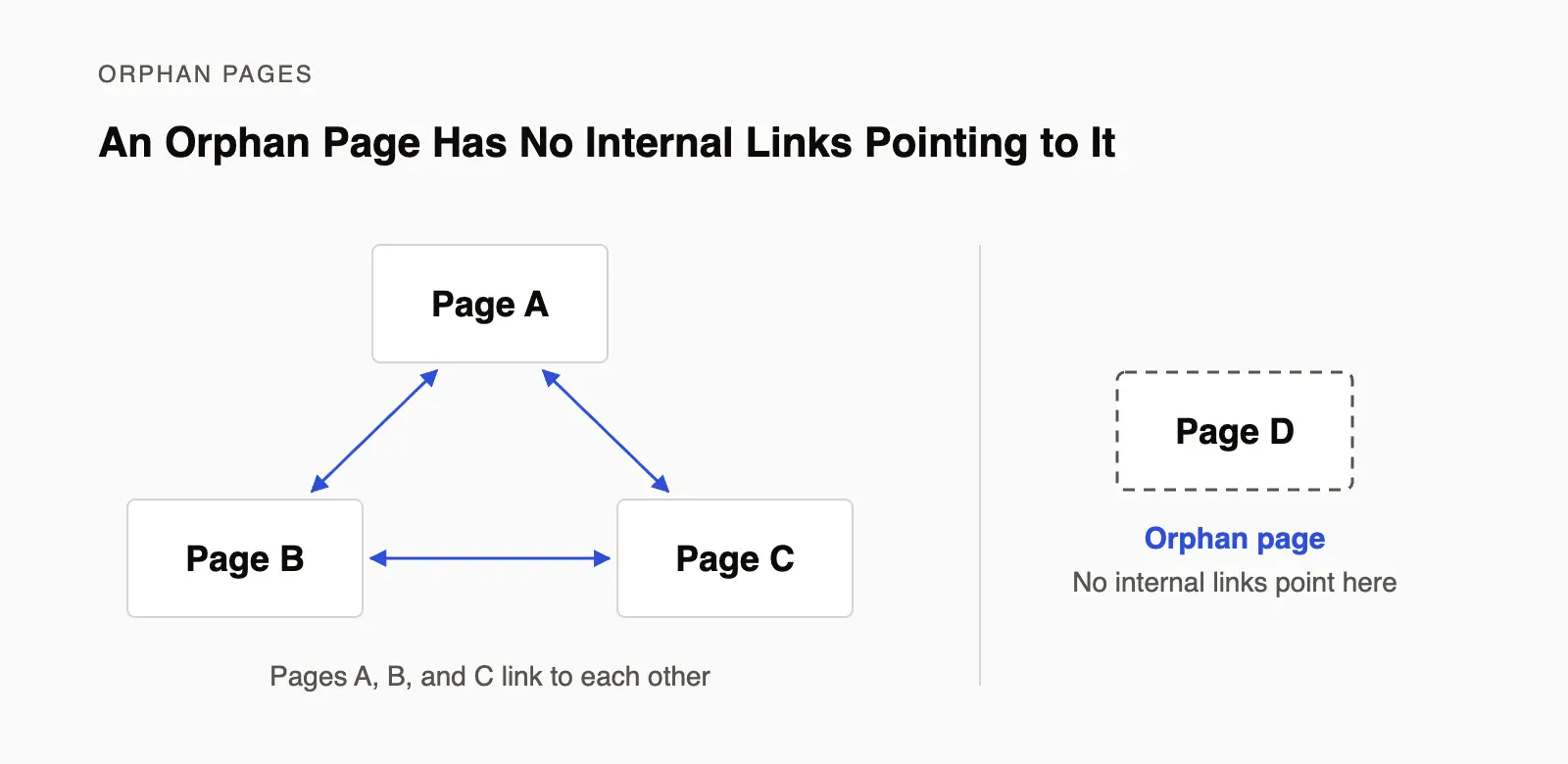
Pages A, B, and C link to each other. Page D has no internal links pointing to it, so it is an orphan page.
The fix is to add contextual links to Page D from Pages A, B, and C wherever its topic comes up. Orphan pages like this are one of the first things to look for when you audit your site.
This guide covers the basics. For specific plays you can run on your own site, read our guide to internal linking strategies.
Best Practices for Internal Linking
The three practices below are the place to start. For the full checklist, read our guide to internal linking best practices.
1. Create a Robust Internal Linking Strategy
Linking to high-quality and relevant pages is crucial for maintaining link value and ensuring a seamless user journey.
When developing an internal linking strategy, focus on creating links that enhance user experience and not just SEO.
Use descriptive anchor text to give users and search engines clear signals about the linked page's content and match the intent of related search queries.
2. Avoid Common Pitfalls
Common issues like broken links, orphan pages (pages with no incoming internal links), and improper redirects can harm SEO.
It's also important to understand the use of nofollow tags, which instruct search engines not to pass link equity.
While nofollow links can be useful in certain contexts, overuse can hinder your optimization efforts.
Ensuring text links are clear and well-placed is also vital for usability.
3. Monitor and Measure Results
Regularly monitoring your internal linking structure using tools like Clearscope, Google Search Console, or Screaming Frog is crucial.
These tools help identify issues like broken links and provide insights into metrics such as crawl depth, while Google Analytics can help you identify issues with engagement or bounce rates.
This data can guide adjustments to your internal linking strategy to improve SEO performance.
How to Audit Your Internal Links
An internal link audit is a review of how the pages on your site link to each other. It is a routine technical SEO task, and it is worth repeating after you publish or remove a lot of content.
Start by running a crawler over your site so you have a list of every page and the links that point to it. Then work through four checks.
1. Find Orphan Pages
Orphan pages have no internal links pointing to them. To find them, compare the URLs in your XML sitemap with the pages your crawler reached by following links. A URL that is in the sitemap but was never reached is likely an orphan.
Link to each orphan page from at least one related page, or remove it if it no longer has a purpose.
2. Fix Broken Internal Links
Broken internal links point to pages that have been deleted or moved. They send readers to an error page, and they stop link value from reaching the page you meant to link to.
Update each one to point to the live page or its closest replacement. We have a separate guide on how to find and fix broken links.
Do the same for internal links that pass through redirects. Google advises against long redirect chains because they hurt crawling. That matters most on very large sites, where crawl budget (the time and resources a search engine gives to crawling your site) can run short.
3. Check Crawl Depth
Crawl depth is the number of clicks it takes to reach a page from your homepage. The deeper a page sits, the harder it is for readers and crawlers to reach.
If an important page is buried deep in your site hierarchy, link to it from your pillar page, a category page, or a popular article.
4. Review Anchor Text
Look at the anchor text of the links pointing to each important page. It should describe the page it links to and, where it reads naturally, include that page's target keywords.
Replace vague anchors such as "click here" and "read more" with descriptive ones.
Also check that links between your own pages are regular followed links, often called dofollow links. Google's guidance is to use nofollow only for sources you do not trust, so it rarely belongs on a link to one of your own pages.
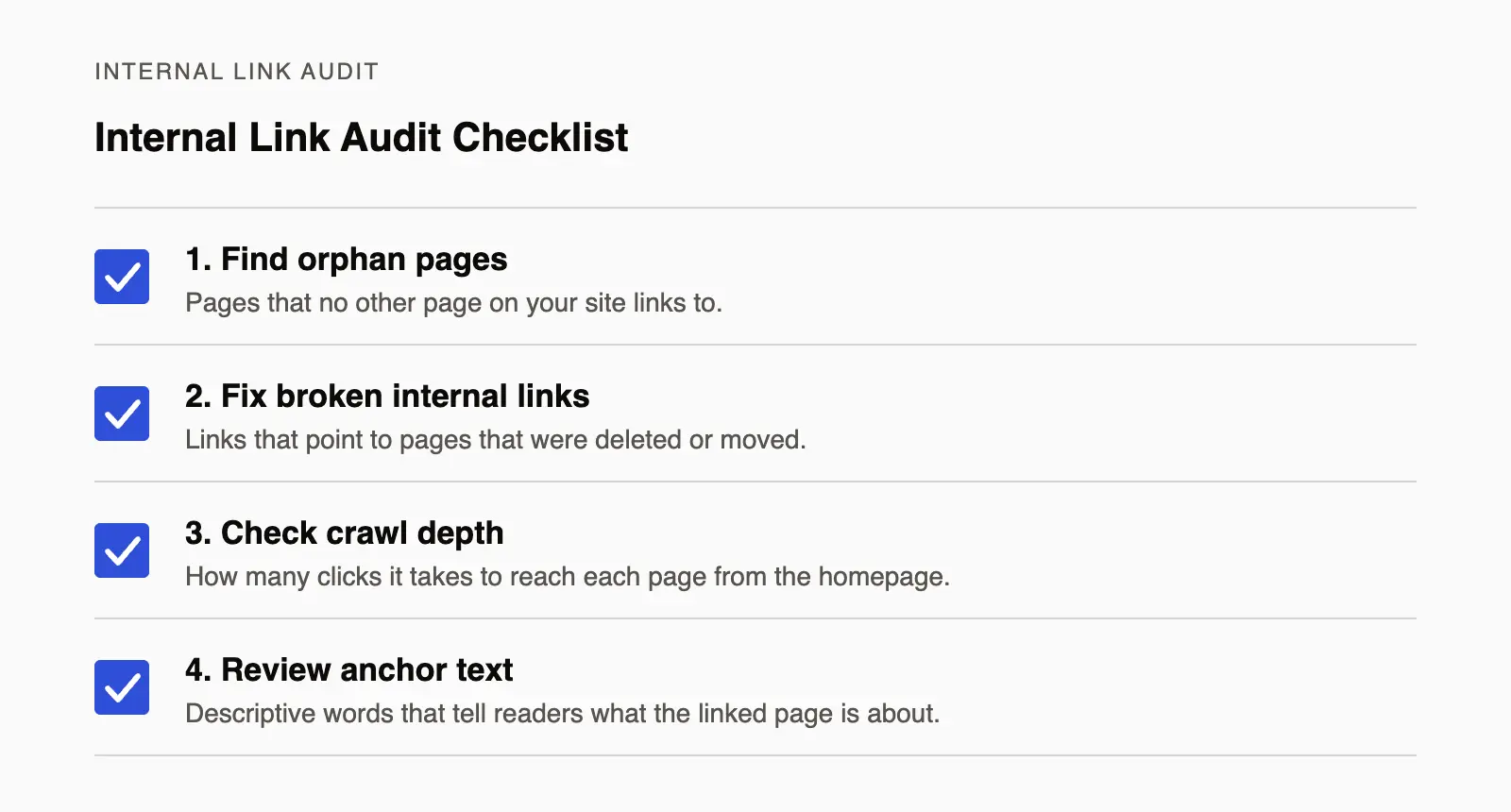
Four checks to run in an internal link audit.
Additional Considerations for Internal Linking
Internal Linking in Different Contexts
Internal linking strategies can vary depending on the type of website.
For instance, ecommerce sites might focus on linking product pages and categories, while blogs might emphasize content marketing and related articles.
Regardless of the context, effective internal linking supports broader digital marketing and SEO strategies.
The Role of Internal Links in SEO Tools
Tools like Clearscope, SEMrush, or Ahrefs offer features that help spot internal linking opportunities.
Unlike traditional SEO tools, Clearscope specifically can help you easily identify valuable pages in your Content Inventory that need more internal links.
SEO case studies often highlight how strategic internal linking, including offering breadcrumbs and follow links, can improve a site's SEO performance.
How to Find Internal Link Opportunities With Clearscope
An audit shows you what is broken. It does not show you the links you have not added yet, and finding those by hand means rereading every page on your site.
Clearscope's Internal Linking view does that search for you. It analyzes the pages you have imported, finds the top three queries for each one based on impressions and clicks, and scans your other pages for places where those queries appear.
For each page, the view shows how many internal links already exist and opens a list of recommended new links. Each recommendation names the pages to connect and suggests anchor text.
To use it, open Pages in Clearscope and select Internal Linking from the views at the top.

Common Questions About Internal Linking
What are backlinks?
Backlinks are external links from one website to another. They differ from internal links, which are within the same website.
What is the difference between internal and external linking?
Internal linking connects different pages within the same website, while external linking connects pages across different websites.

Differences between internal and external links.
What do we mean by descriptive anchor text?
Descriptive anchor text clearly describes the content of the linked page, helping both users and search engines understand the link's context.
How do you build an internal linking strategy for SEO?
To build an internal linking strategy, start by identifying key pages and content that need more visibility.
Use descriptive anchor text and place links in strategic locations. Regularly audit and update the internal linking structure to ensure optimal SEO performance.
Additional Resources and Citations
For more detailed information on internal linking and SEO strategies, check out these resources:
12 Internal Linking Best Practices for SEO
12 internal linking best practices for SEO, from passing link equity and building topic clusters to anchor text, crawl depth and regular link audits.
5 Effective Internal Linking Strategies to Improve Your SEO
Advance your internal linking efforts by exploring several effective strategies that can help improve user experience, engagement, and SEO performance.
How To Find Broken Links on Your Website and Fix Them
Discover the best tools to help you monitor broken links on your website and fix them to improve your SEO rankings and overall online user experience.