On-Page SEO Checker: What It Checks and Which Tools to Use
Topic: SEO
Published:
Written by: Bernard Huang
There are two aspects of managing on-page SEO:
You need on-page SEO checkers to analyze existing site content and pinpoint pages with SEO issues or unoptimized content.
You need tools to check on-page SEO during content creation, so you can publish SEO-friendly content (and reach the first page of Google sooner).
We walk through the process and review solutions for both categories so you can audit website content, clean up your site, and learn the best ways to create SEO-friendly site content.
Clearscope is content optimization software with features to guide keyword research, write SEO-optimized content, and monitor on-page SEO scores. You can explore our SEO tools in Clearscope’s Essentials Plan or schedule a free demo to discuss your website issues and see where our tool can support your teams.
What an on-page SEO checker checks
An on-page SEO checker is a tool that reads one web page and reports on the on-page SEO elements that affect how search engines understand and rank it. You enter a URL, and most checkers return a score and a list of issues to fix.
Some are a free SEO checker you run in your browser (you’ll also see them called an SEO analyzer). Others are part of a site audit tool that crawls every page for technical SEO problems. Neither kind looks at off-page signals such as backlinks. That’s a separate audit.
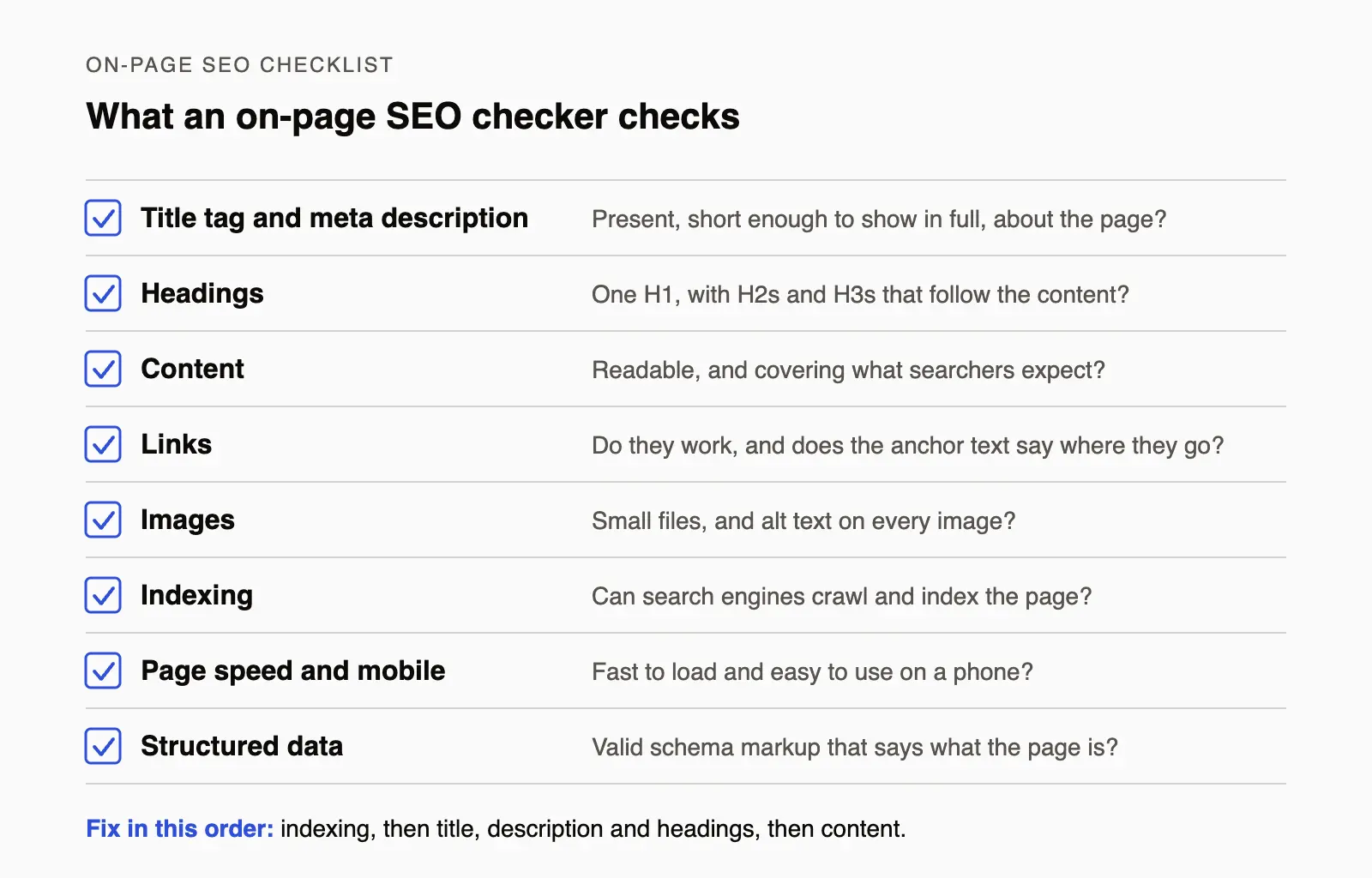
The checks a typical on-page SEO checker runs, and the question each one answers.
Not every tool runs every check, but a typical on-page SEO analysis covers these eight things:
Title tag and meta description. Does each one exist, is it short enough to show in full in search results, and does it describe the page? Together with the other tags in the page’s head, this is the page’s metadata.
Headings. Is there one H1, and does the heading structure (the H2s and H3s) follow the order of the content?
Content. Is the page easy to read, and does it cover the topics searchers expect? Some checkers report keyword density. A content tool compares the terms you use with the pages that already rank.
Links. Do the internal and external links work, and does the anchor text say where each link goes?
Images. Are the files small enough to load fast, and does each image have alt text? Checkers often list images with missing alt attributes.
Indexing. Can search engines crawl and index the page at all? This covers the status code, robots.txt rules, noindex tags and canonical tags. A canonical tag that points to another URL asks search engines to index that URL instead.
Page speed and mobile usability. Does the page load fast and work well on a phone? Speed is usually reported as Core Web Vitals, Google’s measures of loading, responsiveness and layout stability.
Structured data. Does the page have schema markup that tells search engines what it is (an article, a product, an FAQ), and is the markup valid?
How to read the results
The score is the tool’s own summary of the checks it ran. Search engines don’t use it, so treat it as a way to compare pages and to see whether a fix worked, not as the goal.
Work through the issues in this order:
Anything that blocks indexing. A noindex tag, a robots.txt block or a wrong canonical tag keeps the page out of search results, so nothing else matters until it’s fixed.
What searchers see. Fix the title tag, meta description and headings next.
The content itself. Check that the page answers the search as well as the pages that rank above it. A technical check can’t tell you that, which is why this guide pairs an on-page SEO audit with a content tool.
Everything else. Treat warnings about keyword density or text-to-code ratio as hints, not rules.
Then run the check again and note the date, so you can match each fix to changes in your search engine rankings and search visibility.
Before you start: build your content inventory
The first step in checking on-page SEO is to build your content inventory — aka the list of all of the web pages that exist on your site (including blog content, product pages, website resources pages, your homepage, and any other pages you want to keep an eye on).
This way you can get a general idea of what lives on your site before you begin checking SEO scores and auditing content. A well-built content inventory provides organization while auditing on-page SEO and gives you a foundation to build upon as you publish new content.
Assembling a content inventory requires some legwork but has many benefits:
It supports the content audit process (later in this guide) because it allows you to keep track of website URLs and critical SEO metrics in one place.
You can see all the content that lives on your site — nothing slips under the radar, and you can avoid overlap when planning new content.
You can identify low-performing content and add it to your list for updates.
You can monitor content and on-page SEO to keep your site competitive (and prevent rankings or organic traffic from dipping).
To build your content inventory, you can use an XML site map generator (like Screaming Frog) to gather all of the URLs from your site — then you can export the report to a spreadsheet.

Content Inventory to check website SEO
Screaming Frog’s SEO Spider is free for crawls of up to 500 URLs (a paid licence removes the limit). It can also analyze page titles and meta descriptions, find broken links, audit redirects, review robots directives, discover duplicate content, and audit hreflang attributes, so you have less information to gather during the page audit.
Learn more here: How to Create a Content Inventory & Perform a Content Audit
Check SEO scores for every published page with Clearscope Monitor
Clearscope Monitor lists every page you track with its Content Grade (our score for how well the page covers its target query), clicks and SEO value, so you can check the SEO health of your published pages in one place. In the app, this is the Pages tab (our help docs call it Content Inventory).
To set it up:
Connect your Google Search Console property, then add pages. You can import a whole subdirectory of your site or add individual URLs by hand.
Tag pages so you can save your own views by tag, grade or URL.
Clearscope picks a target query for each page and grades the page against it. If that isn’t the query you want to rank for, replace it with your own.

Clearscope SEO checker tool
Clearscope re-checks your pages every month, and you can refresh a page’s Content Grade whenever you like. Each page also has its own history: clicks, impressions and position from Search Console, with Google updates marked on the chart so you can see what changed and when.
With these insights, it’s easy to tell which web pages need attention. Saved views gather the pages with content decay, striking-distance queries, technical issues and internal linking gaps, so each view works as a to-do list.
The Technical Issues view covers the indexing side of an on-page check. It lists the tracked pages that Google may not be indexing because of redirects, canonical tag errors, crawl errors or a robots.txt block, with a short explanation of each issue.
You can add new URLs as you publish content, or have Clearscope import newly published pages automatically, and then monitor all site content and take action to prevent SEO scores from slipping.
But before you proceed with updating page content, we suggest completing a more comprehensive on-page SEO audit so you can identify all on-page SEO issues and opportunities to improve content performance.
Use Sitechecker to audit page content

Sitechecker SEO audit tool
Now it’s time to dive deeper into page content by performing an on-page SEO audit. One option for this step is Sitechecker’s free SEO checker.
It complements the tools above by reviewing the SEO elements of a page and listing the issues it finds, labeled Critical or Warnings. Enter the page URL to generate an SEO report with an overall SEO score.
According to Sitechecker’s own page, the report covers:
Status code and indexation status
Titles and meta descriptions, checked for how they will look in Google’s preview
Heading structure, from H1 to H6
Text length
Code-to-text ratio
All of the links within content — internal links and external links, including the anchor text used with links — so you can make updates accordingly
Images — broken images and image file size, so you can find heavy files and replace them (large assets slow down page load speed)
Missing or incorrect alt attributes
PageSpeed Insights scores for mobile and desktop
Canonical URLs, hreflang, redirects, and the robots meta tags and robots.txt rules that control indexing
Open Graph markup

Sitechecker search engine optimization report (Source: Sitechecker)
We should note — Sitechecker offers extra SEO tools, including:
A website crawler for technical SEO. Sitechecker says its full site audit covers more than 300 technical issues, ranked by importance.
Website monitoring to track changes on your site that matter for SEO.
A rank tracker to monitor where your website ranks for specific search queries.
The checker is free to try, and Sitechecker offers a free trial for a full site audit.
By this point, you should:
Know which web pages have low SEO scores and need attention.
Understand the SEO issues you need to address across site pages.
Have a list of web pages on your radar for updates.
From here, you can begin updating content to improve SEO!
Use Clearscope’s real-time SEO Drafts to reoptimize site content (and create new SEO-friendly content)

Clearscope drafts with real-time SEO analysis
Clearscope Drafts show you how to update and write optimized content. Plus, you can always see your current Content Grade as you work.
Here’s the process:
Create a Draft for the target keyword and paste your site content. From Monitor, one click opens a slipping page as a Draft.
We display your current Content Grade, readability level, and word count, and the Terms list shows which suggested terms your content already uses.
We provide a list of recommended terms to include in the page headers and content, so you can easily understand how to best refresh content for SEO.
Sort the Terms list by “Unused” to see what remains and reoptimize content.
The Terms list and Content Grade update as you make edits, so you can see when content is fully optimized.
Our insights show you exactly how to update the actual page content, and you can follow on-page strategies from Sitechecker reports to ensure you’re covering all bases. To bring SEO scores to an ‘A’, you’ll want to refresh page content, replace internal links, change anchor text, and update in-line media.
When you’re done updating content, you can push changes to your site and refresh the page’s Content Grade in Monitor to confirm the fix. Then, if scores dip again, you can follow these same steps.
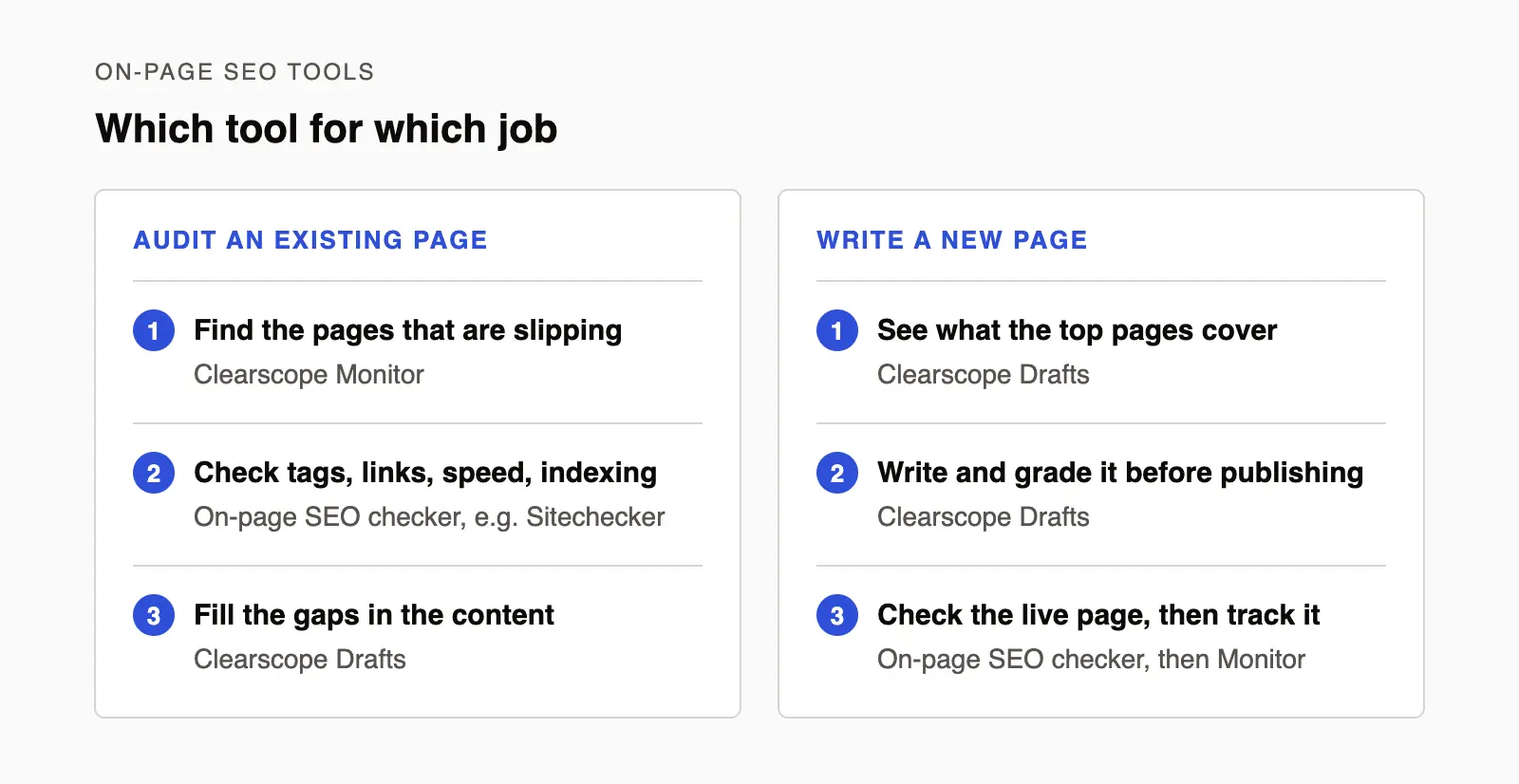
Use a monitoring tool to find the pages, a checker to audit them, and a content tool to fix or write them.
You can also use Clearscope Drafts to create new SEO-friendly content — drafts guide each step of content development, from SERP research and competitor analysis to writing and editing content. Drafts include:
Research — a quick read on search intent: the questions people ask about the topic, pulled from search features like People Also Ask, plus the sources that are commonly cited for it.
Competitors — the pages that rank for your target query on desktop and mobile, each with its word count and Content Grade, so you can see who you’re competing with before you build your outline.
Terms and Term Map — the terms to cover, sorted by importance, and a map of how each top-ranking page uses them, so you can spot the gaps in your own content.
Clearscope Drafts simplify SEO (whether updating site pages or creating new content), so you don’t have to stress about “following SEO best practices.” You can keep your focus on the actual writing process — making high-quality edits, performing spelling and grammar checks, and polishing content for scannability.
Our drafts don’t overwhelm you with recommendations; you aren’t battling keyword stuffing or forcing terms into content. We even use natural language processing so you can use variations of our terms and still achieve an ‘A’ grade. This helps you to maintain high quality content while still “writing for search engines.”
You can learn more about creating optimized content in our demo below:
Before updating or publishing site content, review our checklist below to ensure you’ve addressed critical on-page SEO elements.
Checklist to edit page content for SEO
As we’ve mentioned, content quality is one of the most important ranking factors when considering Google’s algorithm — if content isn’t genuinely relevant, unique, and helpful, it won’t make it to page one or stay in the top rankings for long.
Aside from checking the quality of the content you’re publishing, you should also scan through your post and review:
The SEO title tag and meta description. You usually plug this in the CMS before publishing; ensure your titles and meta descriptions meet length requirements and include the relevant target keyword.
Internal links. How many internal links does the content include? Where do the links take readers?
External links. Are you linking to sites with high DA ratings? Are external links relevant to the content?
Anchor text. Is it clear where links take readers? Does anchor text include relevant keywords? Teams often make the mistake of using unclear anchor text for the sake of including a link; adding links helps SEO, but you shouldn’t place them where it’s unnatural.
Media. Content should include supporting media (like images, infographics, and videos) to supplement copy and improve the user experience.
Alt-text. Include descriptive alt-text with in-line media to tell Google what media includes and improve content accessibility (for readers with assistive technologies or for times where page content doesn’t render properly).
Before publishing, also consider the post’s readability — you don’t want to throw long walls of text at readers or bury important points.
Break long sections into smaller, easier-to-read blurbs, use bullets to break down complex ideas, and use bolding to emphasize important details. Improving scannability and readability keeps readers engaged, and engagement metrics like time spent on page are key indicators of content quality.
After you confirm that your content checks these boxes, you’re ready to publish!
Read more: 11-Step Checklist for SEO Content Editing
Getting started with Clearscope’s on-page SEO platform
Clearscope Monitor and Drafts let you check and monitor page SEO and make effective updates when re-optimizing content. Staying on top of your site content helps you avoid SEO issues and significant maintenance.
Another perk of Monitor is that you know when to update content, as all content requires a refresh now and then. You can see when grades or clicks slip, audit content, and make updates; it takes out the guesswork, supports your SEO strategy, and lets you use your time productively.
You can begin building your inventory and auditing content by getting started with one of our plans. If you’re interested in learning more about Clearscope and want to see our SEO tools in action, you can schedule a free demo.

How to Get On the First Page of Google SERP: 8 SEO Strategies
We review the best SEO strategies to produce high-quality content & get on the first page of Google search results. See how Clearscope supports your teams.
How to Find Your Goldilocks Keywords With Search Intent Analysis
Learn how to analyze search intent correctly the first time in this step by step guide. That way, you’re creating SEO content that sharply meets user intent.
11 Best AI Writing Tools for Content Marketers (Hands-On Reviews)
We tested 11 AI writing tools, from ChatGPT and Gemini to Jasper and Frase. See what each does well, where it falls short, and who it suits.